RepoBD

Wrong repo. No secret.

RepoBD is a developer tool for one-time secret transport, with delivery bound to the intended Git repository.

Send a secret from one clone. Pull it from another.

If the repository doesn't match, the secret isn't retrieved.

npm install -g repobd
~/repo-a

repobd pull

Applied DEMO_TOKEN to .env.

~/repo-b

repobd pull

Repository mismatch. Secret was not retrieved.

~/repo-c

Built for the way developers work now.

More repositories. More terminals. More developers. More agents.

Development keeps getting more parallel. Secret handoff still depends on choosing the right context.

RepoBD adds a repository check at the last mile.

AI-ASSISTED DEVELOPMENT

Multiple AI agents. One human in the middle.

Claude Code is working in one repository. Codex is working in another. More agents may be running in parallel.

You can still paste the right delivery link into the wrong agent session.

RepoBD doesn't stop you from choosing the wrong terminal.

It stops that mistake from placing the secret into the wrong repository.
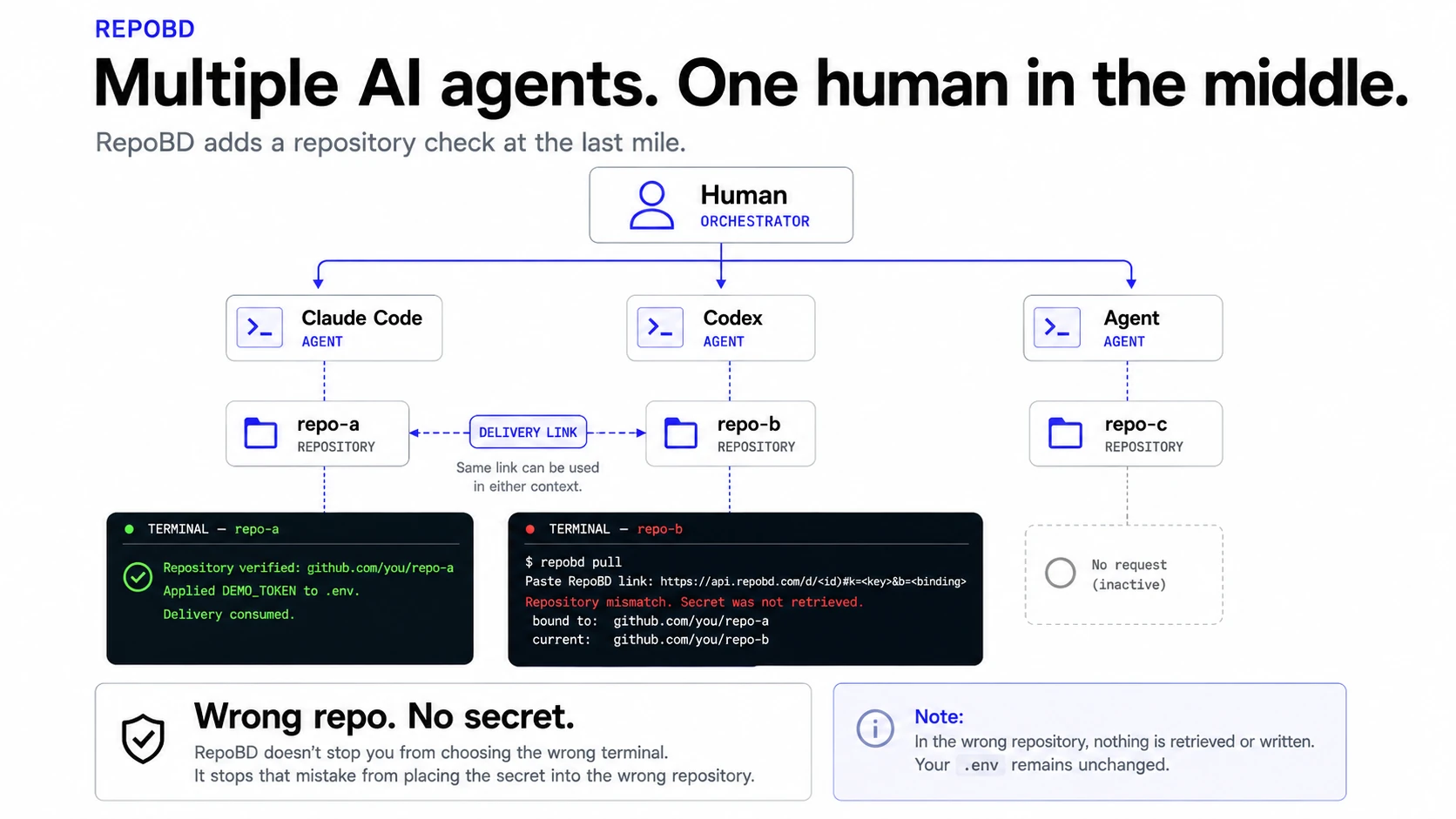
AI-assisted development flow showing one human working across multiple AI agents and repositories, with RepoBD checking the current repository before secret retrieval.

What happens

A human or agent can paste the same delivery link into different terminal contexts. RepoBD does not choose the terminal.

It checks the current repository before retrieving the secret.

Wrong repository → secret not retrieved.

Wrong repo. No secret.
SOLO DEVELOPMENT

One developer. Multiple repos.

Three terminals. Three repositories. One delivery link in your clipboard.

You have the right secret — but you're standing in the wrong repo.

RepoBD checks the repository before retrieving it.

Delivery → repo-a

Terminal A → repo-a   MATCH
Terminal B → repo-b   MISMATCH
Terminal C → repo-c

Wrong repo → no secret → no .env change.

TEAM DEVELOPMENT

Developer to developer.

A teammate needs a local development secret.

Create a one-time RepoBD delivery in your clone and send the link through the private channel you already use.

They pull it from their own clone.

The local folders can be completely different. The Git repository is what matters.

If the repository matches, RepoBD applies the secret to the local .env.

If it doesn't, RepoBD stops before retrieving it.

Developer A
/Users/alice/project
        │
    repobd send
        │
        ▼
one-time delivery link
        │
 Slack / DM / private channel
        │
        ▼
    repobd pull
        │
Developer B
/home/bob/project

same Git origin
      ↓
    MATCH

The secret travels with repository context.

More repos + more terminals + more developers + more agents
                    ↓
           More context switching
                    ↓
          Right secret. Wrong repo.
                    ↓
          Wrong repo. No secret.
more repos
+ more terminals
+ more developers
+ more agents
        ↓
More context switching
        ↓
Right secret. Wrong repo.
        ↓
Wrong repo. No secret.

Humans choose the context. RepoBD verifies the repository.

Secrets stay out of Git. But they still have to move.

Slack → terminal.

DM → terminal.

Developer → developer.

Agent → agent.

The risk isn't always how the secret travels. Sometimes it's where it lands.

A one-time link controls who can open a secret, once. It says nothing about where that secret belongs.

Git already gives your code a repository identity. RepoBD carries that identity along with the handoff — instead of leaving it to memory and a glance at the terminal title.

How RepoBD Works

See the repository check in action.

Send from repo-a, try the same delivery in repo-b, then return to the intended repository.

Demo: wrong repository → no secret; intended repository → applied; successful use → consumed.

Right repo

~/repo-a

repobd send

This repository: github.com/you/repo-a

Secret name (KEY): DEMO_TOKEN

Secret value: TEST_VALUE

Delivery created. It can be used once, in that repository, within 15 minutes.

https://api.repobd.com/d/<id>#k=<key>&b=<binding>

~/repo-a (another clone, another machine)

repobd pull

Paste RepoBD link: https://api.repobd.com/d/<id>#...

Repository verified: github.com/you/repo-a

Will add DEMO_TOKEN to .env.

Applied DEMO_TOKEN to .env.

Delivery consumed.

Wrong repo

~/repo-b

repobd pull

Paste RepoBD link: https://api.repobd.com/d/<id>#...

Repository mismatch. Secret was not retrieved.

bound to: github.com/you/repo-a

current: github.com/you/repo-b

  • Encrypted locally before anything leaves your machine. The server stores the encrypted envelope and non-secret lifecycle state — never the plaintext, the decryption key, or the repository identity.
  • One-time delivery with a 15-minute TTL. A wrong repository is rejected before any network call, so the delivery stays usable in the right place.
  • Repository identity comes from the Git origin — never the local filesystem path.
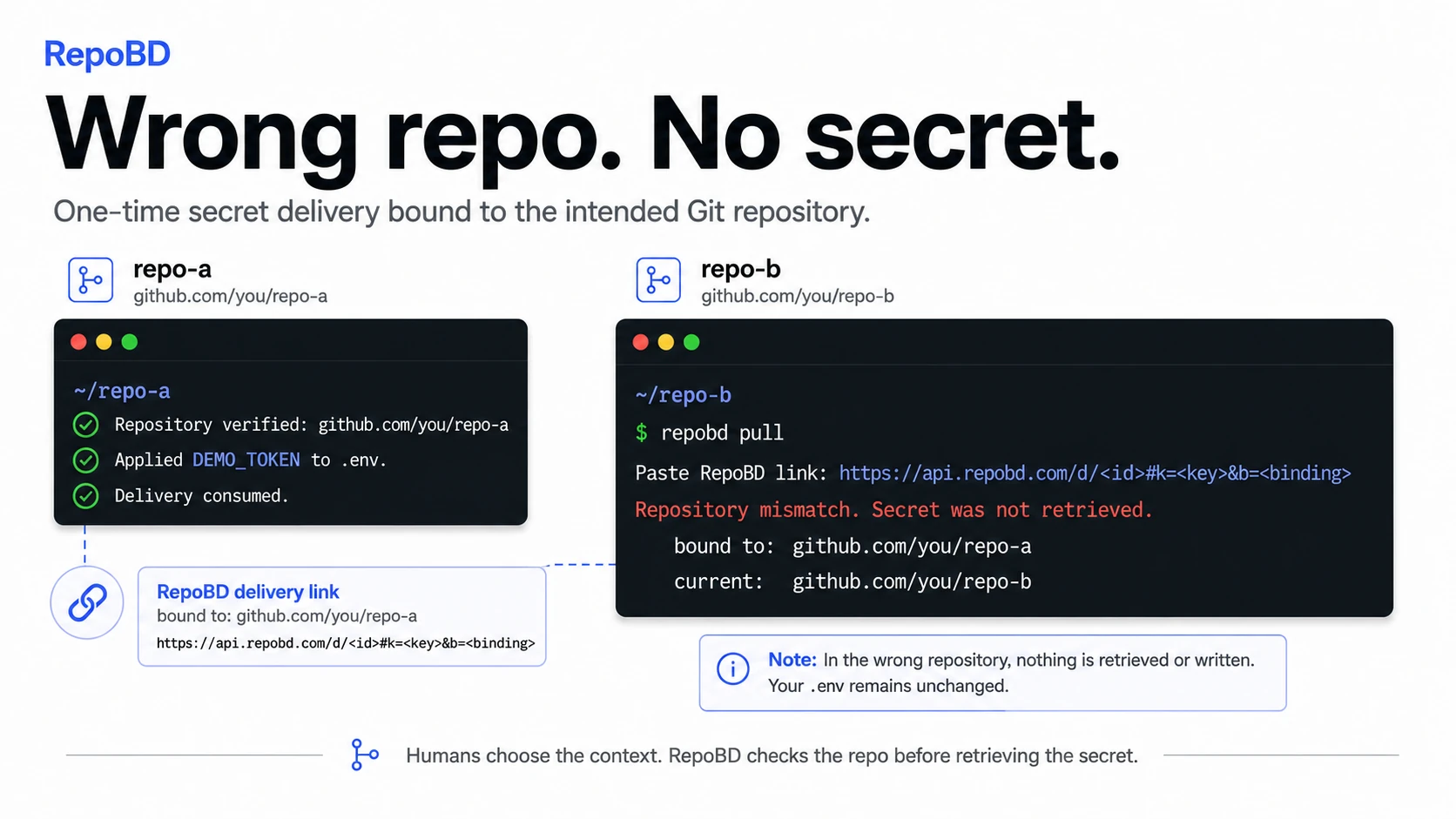
RepoBD delivery link checked against two repositories: repo-a matches and receives the secret, while repo-b mismatches and does not retrieve it.

What happens

The same delivery link can be used from repo-a or repo-b.

  • repo-a matches → secret retrieved and applied.
  • repo-b mismatches → secret not retrieved; .env remains unchanged.

A guardrail, not a vault.

RepoBD is designed to

  • bind delivery to the intended repository
  • reject a mismatched repository before retrieval — before any network call
  • make successful pulls one-time: a successfully consumed delivery cannot be used again, within a 15-minute TTL
  • keep plaintext secrets and decryption keys off the server

RepoBD is not

  • a secret manager, vault, or production secret store
  • a password manager
  • protection against a compromised machine or a malicious local user
  • a replacement for Vault, 1Password, or AWS Secrets Manager

Repository binding is a guardrail against accidental misuse — not cryptographic authentication.

RepoBD verifies repository identity. It does not distinguish branches, environments, credential purpose, or recipients within the same repository.

Repository-bound secret delivery: common questions

How can I safely send API keys or .env values to another developer?
Run repobd send inside the Git repository the secret belongs to, then share the secret-bearing one-time delivery link through a private, trusted channel. The recipient runs repobd pull from their clone of that repository, and RepoBD applies the value to its root .env only after the repository matches.
How can I prevent secrets from being used in the wrong Git repository?
RepoBD derives repository identity from the Git origin and puts a repository binding in the delivery link. On pull, it compares that binding with the current repository before any network call. If they do not match, the secret is not retrieved or written, and the delivery remains usable in the intended repository.
What is repository-bound secret delivery?
It is a one-time secret handoff that can be retrieved only when the receiving Git repository matches the repository chosen by the sender. RepoBD compares canonical repository identity, not local folder paths.
Is RepoBD a replacement for a full secrets manager?
No. RepoBD focuses on the secret handoff and transport boundary. It is not a password manager, vault, production secret store, identity service, secret rotation service, or general team permission-management system.

Quick Start

Install

npm install -g repobd

Requires Node.js 22.12 or later.

Send — in the repository the secret belongs to

~

cd my-service

repobd send

Pull — in the receiving clone

~

cd my-service

repobd pull

The delivery link carries the key — share it only through a private, trusted channel, never a public issue, channel, log, or document.

Full guide → README

Wrong repo. No secret.

Add repository context to the secret handoff you already use.

npm install -g repobd